

PyTorch Model Fine-Tuning
Based on Transformers, openMind Library integrates the functions of mainstream third-party tools in the PyTorch framework and provides a one-stop fine-tuning solution, covering data processing, weight loading, low-parameter fine-tuning, and quantization adaptation, fine-tuning and training tracing. openMind Library also provides acceleration methods such as Ascend NPU affinity operator optimization, significantly improving model training efficiency.
openMind Library supports the following fine-tuning features:
- Fine-tuning phase: SFT
- Efficient parameter fine-tuning algorithms: Full, LoRA, and QLoRA
- Acceleration: npu_fusion_attention and npu_rms_norm
- Training monitoring: SwanLab
- Distributed training: single-node multi-card – DDP; single-node multi-card – DeepSpeed
- Export: LoRA weight merge
openMind Library provides a command-line interface (CLI) that allows you to easily implement training in a shell environment. You only need to run the openmind-cli train demo.yaml command to dynamically parse the configuration parameters in the YAML file and automatically complete the entire training process.
The CLI is built in openMind Library and can be used once openMind Library is installed. For details, see the openMind Library Installation Guide.
Model Fine-tuning Example
openMind Library starts fine-tuning training by parsing the YAML file. You need to configure a YAML file related to fine-tuning and run the file using the openmind-cli train command. openMind Library automatically parses parameters and configures and runs the fine-tuning process. The following is a simple executable demo.yaml file.
# model
model_id: Qwen2-7B

# method
stage: sft
do_train: true
finetuning_type: full
logging_steps: 1
max_steps: 10

# dataset
dataset: alpaca_zh_51k, alpaca

# train
output_dir: saves/Qwen2-7B/sft/lora/
overwrite_output_dir: true
Run the following command:
openmind-cli train demo.yaml
The YAML file contains fine-tuning algorithm parameters, model parameters, dataset parameters, and training parameters. You can perform more detailed configurations based on the actual fine-tuning training requirements.
We also provide openMind Fine-Tuning Tutorial. You can further understand fine-tuning based on the notebook example in the space.
Fine-tuning Algorithm and Parameter Configuration
You can set the stage parameter to select the model training process. Only sft fine-tuning is supported.
stage: sft
Full-Parameter Fine-tuning
openmind-cli train allows you to select full-parameter training or low-parameter fine-tuning training. You can configure fine-tuning_type. Full-parameter training can be configured as follows:
finetuning_type: full
LoRA Fine-tuning
If you need to fine-tune LoRA, perform the following operations:
Configure finetuning_type in the script to start LoRA fine-tuning.
finetuning_type: lora
To adjust the LoRA fine-tuning configuration, add the following parameters:
finetuning_type: lora
lora_alpha: 16
lora_dropout: 0
lora_rank: 8
lora_target_modules: q_proj
Default values are provided for the lora_alpha, lora_dropout, and lora_rank parameters. You do not need to configure them unless necessary. The default value of lora_dropout is 0, the default value of lora_rank is 8, and the default value of lora_alpha is lora_rank * 2.
The lora_target_modules parameter has the following options:
- If this parameter is not set, a proper mediation is automatically selected based on
model_typein theconfig.jsonfile. For example, theQwen2series models are automatically identified asq_proj, k_proj. - If this parameter is set to all, all adaptable layers of the model participate in the fine-tuning of low-parameter values.
- If this parameter is set to a specific layer, for example,
q_proj, k_proj, the system automatically checks whether the layer supports low-parameter training. If yes, the layer is in the training.
QLoRA Fine-tuning
QLoRA fine-tuning combines quantization and LoRA fine-tuning to reduce computing resource requirements and graphics memory usage. openmind-cli train supports bitsandbytes-based QLoRA fine-tuning. 4-bit quantization in NF4 is supported. You can use the load_in_4bit parameter to enable the function. The details are as follows:
Step 1 Install bitsandbytes on the Ascend NPU. For details, see the bitsandbytes or refer to the following process:
Prerequisites: Before installing bitsandbytes, ensure that the CANN package and torch_npu have been installed in the environment and source /xxx/your_folder/cann/ascend-toolkit/set_env.sh has been set. For details, see [OpenMind Library Installation Guide](../../install.md#optional-step 2-installing-the-cann-package). Install CMake 3.22.1 or later and g++ 12.x or later. If CMake is not installed, run the following commands to install the compilation environment:
apt-get install -y build-essential cmake # Note: This is the command for installing the Debian OS. Replace openEuler and CentOS with the corresponding commands.
Before installing bitsandbytes, check whether the installation environment is configured as follows:
# source /xxx/your_folder/cann/ascend-toolkit/set_env.sh # Run this command on the terminal and replace the path with the actual installation path.

import torch
import torch_npu

x = torch.randn(2, 2).npu()
y = torch.randn(2, 2).npu()
z = x.mm(y)
print(z)

# If the environment is available, the code output is as follows:
# tensor([[-0.9307,  2.9402],
#        [-0.4377, -1.5141]], device='npu:0')
After the installation environment is ready, perform the following steps to compile and install bitsandbytes:
1. git clone -b multi-backend-refactor https://github.com/bitsandbytes-foundation/bitsandbytes.git

2. cd bitsandbytes/

3. cmake -DCOMPUTE_BACKEND=npu -S .

4. make

5. pip install -e. # Before the installation, ensure that you have entered the corresponding Python environment. -e indicates that the installation is editable. If the development bnb is not used, deselect this option.
If an exception occurs during the compilation, run the git clean -dfx command in the bitsandbytes directory to clear all intermediate files generated during the compilation, check the compilation environment, and run the preceding commands again.
Step 2 Start the QLoRA fine-tuning and add the following content to the fine-tuning configuration file:
load_in_4bit: True
finetuning_type: lora
bf16: True
Note that when load_in_4bit: True is enabled, finetuning_type: lora and bf16: True must also be enabled.
Fine-tuning Parameters
| Parameter | Description | Type | Default Value | Mandatory/Optional |
|---|---|---|---|---|
| stage | In the training phase, only SFT is supported. | str | sft | Optional |
| finetuning_type | Fine-tuning mode. Options: full, lora | str | full | Optional |
| lora_target_modules | Target module that uses the LoRA method. | str | None | Optional |
| lora_alpha | Scaling factor for LoRA fine-tuning. | int | None | Optional |
| lora_dropout | Drop rate of LoRA fine-tuning. Value range: [0, 1). | float | 0.0 | Optional |
| lora_rank | Rank of LoRA fine-tuning. | int | 8 | Optional |
| load_in_4bit | Supports 4-bit precision for QLoRA fine-tuning. | bool | False | Optional |
Model Configuration
Model Download
During fine-tuning training, you need to specify the model to be downloaded and loaded. The configuration parameters are model_id and model_name_or_path. Note that in the same YAML script, only one of them can be configured.
Method 1: Use the model_id parameter to select a built-in model and match the model repository name in the Modelers community based on the model_id parameter to quickly download the model. The configuration procedure is as follows:
model_id: Qwen2-7B
The following table lists the built-in models, which is continuously updated.
| Model Series | model_id |
|---|---|
| Qwen2 | Qwen2-7B |
| Qwen2.5 | Qwen2.5-7B |
Method 2: Use the model_name_or_path parameter to specify the model repository name or local model path in the Modelers community.
When a local model is used, the absolute path of the model can be passed.
yamlmodel_name_or_path: /local/path/You can specify the Modelers Community model repository name, for example, the AI-Research/Qwen2-7B model.
yamlmodel_name_or_path: AI-Research/Qwen2-7B
Model Download Cache
When model_id or model_name_or_path is used, you can set the cache_dir parameter to specify the weight cache location.
cache_dir: /home/cache_model
The weight is saved in the /home/cache_dir directory. If this parameter is not set, the weight is saved in the default directory. Note that you need to set the HUB_WHITE_LIST_PATHS environment variable when setting the cache_dir path.
export HUB_WHITE_LIST_PATHS=/home/cache_model
Model Configuration Parameters
| Parameter | Description | Type | Default Value | Mandatory/Optional |
|---|---|---|---|---|
| model_id | Model ID. | str | - | Optional |
| model_name_or_path | Local path of the model or repository ID in the Hub. | str | - | Optional |
| trust_remote_code | Whether to trust the configuration file downloaded remotely. | bool | False | Optional |
| cache_dir | Cache path for model download. | str | None | Optional |
| token | Private repository weight token. | str | None | Optional |
| model_revision | Specifies a model version. | str | main | Optional |
| use_fast_tokenizer | Whether to use the fast tokenizer. | bool | False | Optional |
| split_special_tokens | Whether to split a special token. | bool | False | Optional |
| new_special_tokens | Special token to be added to tokenizer. | str | None | Optional |
| resize_vocab | Whether to adjust the size of the tokenizer vocabulary. | bool | False | Optional |
| use_gradient_checkpointing | Whether to use gradient checkpointing. | bool | True | Optional |
Dataset Configuration
Built-in Datasets
You can configure a dataset using the dataset parameter. openMind Library automatically searches for the built-in dataset link and downloads the dataset. For example, after alpaca_zh_51k is set, the corresponding dataset AI-Research/alpaca_zh_51k is downloaded from the Modelers community.
dataset: alpaca_zh_51k
The built-in dataset list is as follows and will be updated continuously:
| dataset | Modelers Community Dataset Repository | Data Type |
|---|---|---|
| alpaca_zh_51k | AI-Research/alpaca_zh_51k | alpaca |
| alpaca | AI_Connect/alpaca | alpaca |
| alpaca-gpt4-data | AI_Connect/alpaca-gpt4-data | alpaca |
| alpaca-gpt4-data-zh | AI_Connect/alpaca-gpt4-data-zh | alpaca |
| sharegpt_gpt4 | AI-Research/sharegpt_gpt4 | sharegpt |
Non-built-in Dataset
You can use a non-built-in dataset and customize a dataset. For details, see [PyTorch Model Fine-Tuning - Data Processing] (./data_process.md).
Dataset Truncation and Padding
Based on the cutoff_len and max_length parameters, openMind Library can pad and truncate the input dataset. The default value of cutoff_len is 1024, and the default value of max_length is None.
cutoff_len: 1024
Example of dataset truncation: For example, dataset A contains 100 samples. After each sample is processed by the tokenizer, the maximum length is 800. When cutoff_len is set to 1024, the final truncation length of dataset A is 800. Assume that the maximum length of dataset A is 1500 after being processed by the tokenizer. When cutoff_len is set to 1024, the final truncation length of dataset A is 1024.
If you need to pad the input dataset, you can set max_length. Each batch of data is processed to a fixed length.
max_length: 1024
Note that if both cutoff_len and max_length are set, max_length must be greater than or equal to cutoff_len.
Dataset configuration parameters
| Parameter | Description | Type | Default Value | Mandatory/Optional |
|---|---|---|---|---|
| dataset | Dataset name. Multiple datasets can be passed. Separate them using commas (,). | str | None | Mandatory |
| custom_dataset_info | Absolute path of the input external dataset configuration file. | str | None | Optional |
| split | Filters sub-datasets using split. | str | Train | Optional |
| subset_name | Sub-dataset name. | str | None | Optional |
| preprocessing_num_workers | Number of processes used for data processing. | int | None | Optional |
| preprocessing_batch_size | Batch size of data processing. | int | 1000 | Optional |
| cutoff_len | End length of the dataset after encoding. | int | 1024 | Optional |
| max_length | Maximum padding length after the dataset is encoded. | int | None | Optional |
| reserved_label_len | Output directory to which the checkpoint is to be saved. | int | 1 | Optional |
| ignore_pad_token_for_loss | Iteration interval for saving checkpoints. | bool | True | Optional |
Training parameter configuration
The openmind-cli train training parameters are inherited from the Seq2SeqTrainingArguments class of the Transformers. The following parameters are commonly used for fine-tuning. For details about more training parameter configurations, see the official document.
Basic configurations
The following parameters are commonly used during training:
max_steps: 100                  # Maximum number of training steps. If this parameter is set to a positive number, `num_train_epochs` will be overwritten.
#num_train_epochs: 2            # Total number of training epochs, that is, the number of times that the complete dataset is traversed.
per_device_train_batch_size: 2  # Training batch size for each device.
gradient_accumulation_steps: 2  # Number of accumulated gradient steps.
learning_rate: 1.0e-5           # Learning rate, which is used to optimize model parameters.
lr_scheduler_type: cosine       # Learning rate scheduler type (such as linear and cosine)
warmup_steps: 0                 # Number of steps for learning rate warm-up.
weight_decay: 0.0               # Weight decay coefficient, which is used for regularization of the model.
Mixed precision configuration
Mixed precision training can effectively improve the training speed and reduce the graphics memory usage. You are advised to enable this function when fine-tuning a model with large parameters or when the graphics memory of the device is limited. You can configure the following training parameters to enable mixed precision training:
bf16: True # Whether to enable the bf16 mixed precision.
Save the model
The model weight needs to be saved for the trained model. For details, see the following configuration:
output_dir: saves           # Directory for storing checkpoints and models.
ovewrite_output_dir: True   # Whether the output is overwritten.
- If
ovewrite_output_diris set toFalseandcheckpointsexist in the path, the lastcheckpointis loaded to continue training. - If
ovewrite_output_diris set toTrue, the originalcheckpointwill be overwritten and the training will start again.
Save checkpoints
You can set the save_steps parameter to save checkpoints to resume the interrupted training process or view the training effect. This parameter indicates the interval for saving a checkpoint.
save_steps: 1000 # Interval for saving a checkpoint.
Operator fusion acceleration
openMind Library supports optimization and acceleration of fused operators on Ascend NPUs. For details about the supported operators and their usage, see Fused Operators.
Distributed training
openmind-cli train supports single-node single-card and single-node multi-card fine-tuning training. You can configure the ASCEND_RT_VISIBLE_DEVICES environment variable to control distributed training.
Single-node single-card training
You can use a specific card to implement single-node single-card training.
export ASCEND_RT_VISIBLE_DEVICES=0
openmind-cli train examples/features/train_sft_lora.yaml
Single-node multi-card - DDP
You can pass multiple card IDs to implement single-node multi-card training.
export ASCEND_RT_VISIBLE_DEVICES=0,1,2,3
openmind-cli train examples/features/train_sft_lora.yaml
Automatic identification of multi-card environments - DDP
If the ASCEND_RT_VISIBLE_DEVICES environment variable is not set, the openmind-cli train command automatically identifies the number of compute cards in the underlying environment and loads all compute cards. If the environment variable has been set, run the following command to cancel the restriction:
unset ASCEND_RT_VISIBLE_DEVICES
You can run the following command to check whether the unset command takes effect. If the unset command is correctly executed, the command output is empty.
echo $ASCEND_RT_VISIBLE_DEVICES
DeepSpeed
DeepSpeed is a specialized acceleration library for PyTorch. It significantly improves graphics memory usage and accelerates the training speed during distributed training. openMind Library supports the zero0, zero1, and zero2 features. Configuration example:
deepspeed: ./ds2_config.json
You need to pass the path of the DeepSpeed configuration file. For details about the DeepSpeed configuration file, see DeepSpeed Description.
Monitor the training
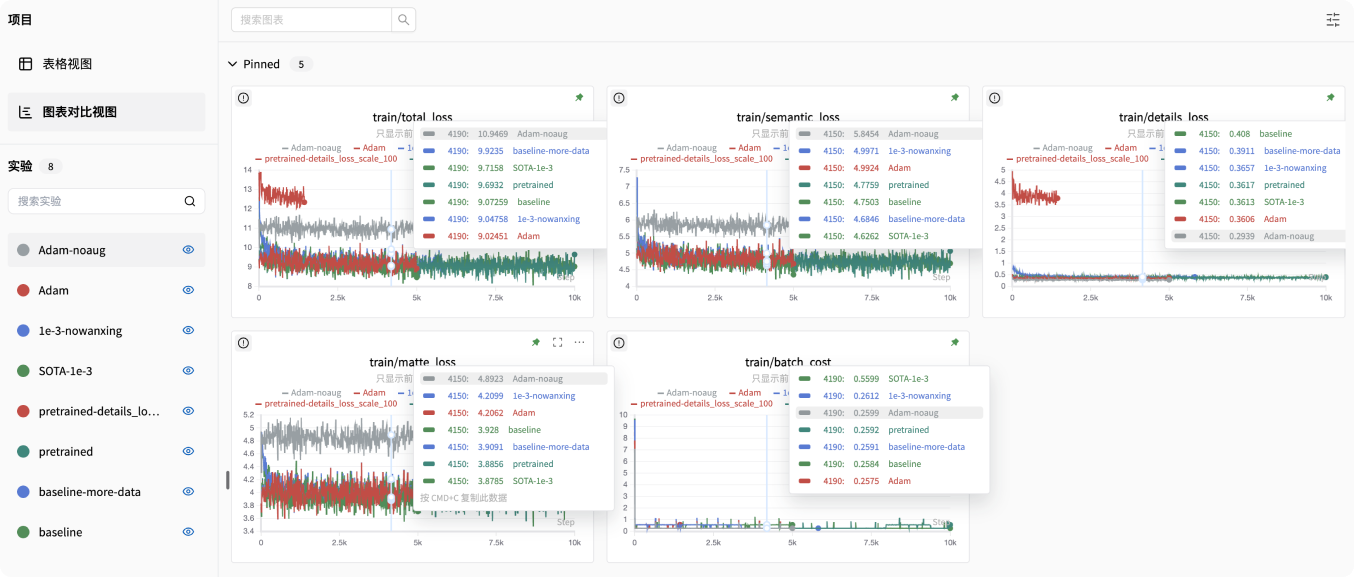
openMind Library supports SwanLab experiment tracking. SwanLab provides user-friendly APIs and easy-to-use UIs, and integrates functions such as hyperparameter tracing, metric recording, online collaboration, and experiment link sharing.
Install SwanLab
pip install swanlab
Configure SwanLab
Configure the following parameters in the YAML file:
report_to: swanlab
logging_dir: ./log
- If
report_tois set toswanlab, SwanLab is used for experiment tracing. logging_diris an optional parameter. It specifies the path for saving SwanLab log files. By default, SwanLab log files are saved in theswanlablogfolder in the current path.
Enable the SwanLab dashboard
Run the following command to enable the SwanLab dashboard. ./log indicates the path for storing SwanLab log files, which is the same as logging_dir.
swanlab watch ./log
The above command returns a URL (http://127.0.0.1:5092 by default). Click the link to access the SwanLab dashboard.
For more information about how to use SwanLab, see the official SwanLab Guide.
Merge LoRA weights
After LoRA fine-tuning, the saved weights are not the weights of the complete model but the weight file of the adapter. This type of weight file contains only parameters related to the LoRA layer and can be used only after being loaded together with the base model weights.
The files saved after LoRA fine-tuning usually include the following content:
output_dir/
├── adapter_config.json  # LoRA configuration file.
├── adapter_config.json  # Weight file of the LoRA layer.
The weight file of a base model usually contains the following content:
base_model_dir/
├── config.json             # Model configuration file.
├── model.safetensors       # Weight file of the base model.
openMind Library provides the openmind-cli export parameter to help you merge weights after LoRA fine-tuning. Similar to the openmind-cli train command, this command is used to perform the merging operation based on the YAML file.
Merge weights of a single adapter
The common YAML file content is as follows. The file can be named merge.yaml and contains the following parameters:
model_idormodel_name_or_path: weight name or path of the base model. For details, see this parameter in theopenmind-cli traincommand.adapter_models: adapter weight path after fine-tuning.output_dir: path for storing the merged weight.
#base model args
model_id: Qwen2-7B
#model_name_or_path: AI_Connect/Qwen2_7B or /home/base_mode/Qwen2_7B

#adapter model args
adapter_models: lora_checkpoint_path

#ouput args
output_dir: ./saves_merge
You can run the following command to complete the merge:
openmind-cli export merge.yaml
Merge the weights of multiple adapters
openmind-cli export supports weight combination for multiple adapters. The following is an example of the YAML file content:
adapter_models: lora_checkpoint_path_1, lora_checkpoint_path_2
Parameters for Configuring the Merge
You can select the following parameters as required.
| Parameter | Description | Type | Default Value | Mandatory/Optional |
|---|---|---|---|---|
| model_id | Model ID. If this parameter is used during training, use this parameter during merging to ensure that the base models are the same. | str | - | Optional |
| model_name_or_path | Local path of the model or repository ID of the Hub. If this parameter is used during training, use this parameter during merging to ensure that the base models are the same. | str | - | Optional |
| adapter_models | Adapter weight path after training. You can set a single path or multiple adapter weight paths separated by commas (,). | str | - | Mandatory |
| output_dir | Path for saving the merged weights. | str | - | Mandatory |
| trust_remote_code | Whether to trust the base model files that are not merged by Transformers. | bool | False | Optional |
| cache_dir | Cache path for downloading the base model. | str | None | Optional |
| model_revision | Specifies the base model version. | str | main | Optional |
| per_shard_size | Size of a single shard during merging. The value 1 indicates that the maximum size of a single model file is 1 GB. If this parameter is not set, the default value 5 GB is used. | int | None | Optional |
| token | Private repository weight token. | str | None | Optional |