Llama3.1 PyTorch模型微调最佳实践
引言
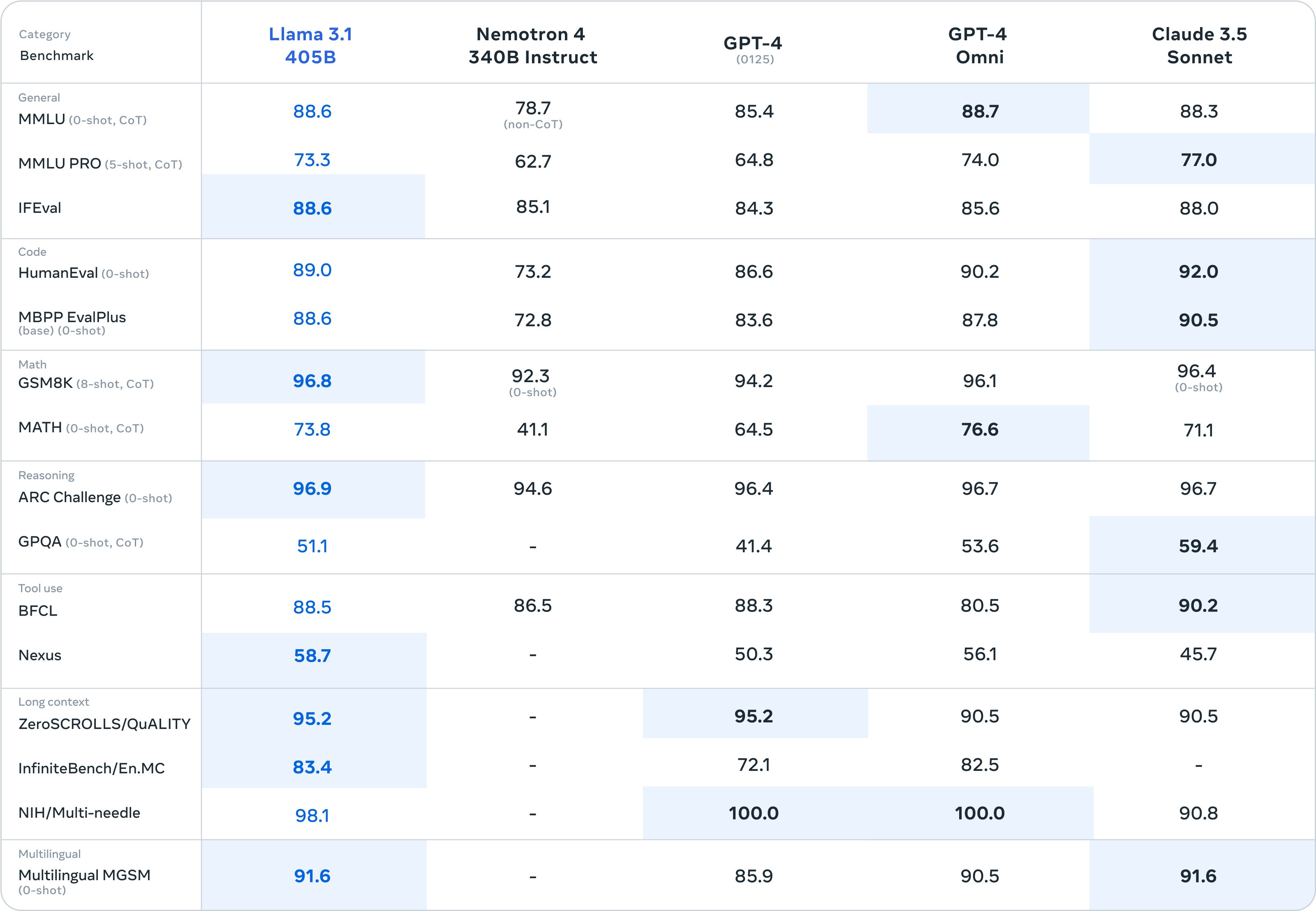
2024年7月23日,Meta正式发布Llama3.1,最长上下文窗口扩展至128K,原生支持8种语言,共推出8B、70B和405B三种规模。根据官方公布的测试结果显示,Llama3.1 405B在多项基准测试中超越GPT-4o和Claude3.5 Sonnet。
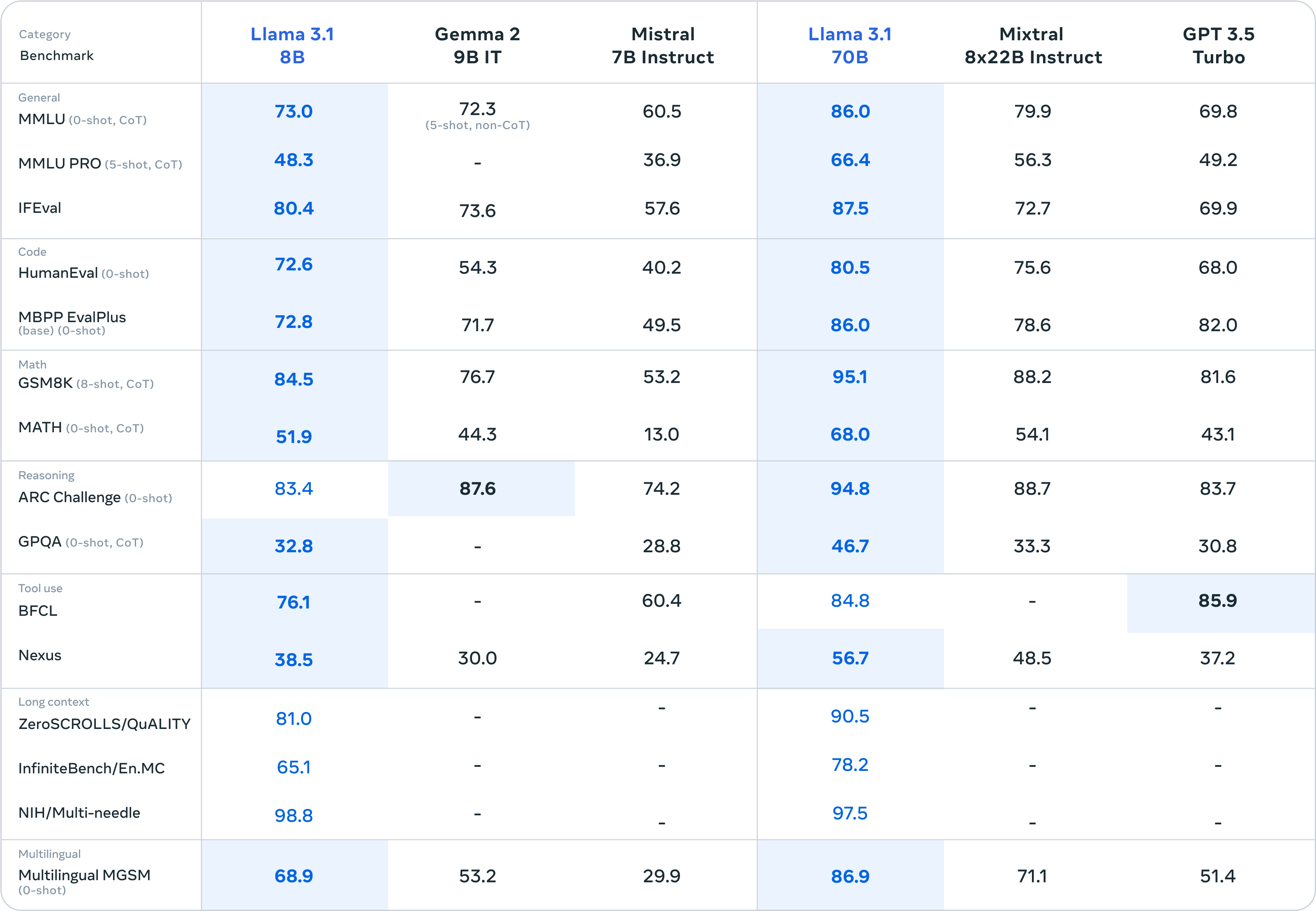
8B和70B版本领跑同等尺寸的其他开源模型,也相当有竞争力。
更多的技术细节请关注官方的技术报告:https://ai.meta.com/blog/meta-llama-3-1/ 。
环境准备
安装Ascend CANN Toolkit和Kernels
安装方法请参考安装教程或使用以下命令。
# 请替换URL为CANN版本和设备型号对应的URL
# 安装CANN Toolkit
wget https://ascend-repo.obs.cn-east-2.myhuaweicloud.com/Milan-ASL/Milan-ASL%20V100R001C17SPC701/Ascend-cann-toolkit_8.0.RC1.alpha001_linux-"$(uname -i)".run
bash Ascend-cann-toolkit_8.0.RC1.alpha001_linux-"$(uname -i)".run --install

# 安装CANN Kernels
wget https://ascend-repo.obs.cn-east-2.myhuaweicloud.com/Milan-ASL/Milan-ASL%20V100R001C17SPC701/Ascend-cann-kernels-910b_8.0.RC1.alpha001_linux.run
bash Ascend-cann-kernels-910b_8.0.RC1.alpha001_linux.run --install

# 设置环境变量
source /usr/local/Ascend/ascend-toolkit/set_env.sh
安装openMind Hub Client以及openMind Library
- 安装openMind Hub Client
pip install openmind_hub
- 安装openMind Library,并安装PyTorch框架及其依赖。
pip install openmind[pt]
更详细的安装信息请参考魔乐社区官方的环境安装章节。
安装LLaMa Factory
git clone --depth 1 https://github.com/hiyouga/LLaMA-Factory.git
cd LLaMA-Factory
pip install -e ".[torch-npu,metrics]"
模型链接和下载
Llama3.1模型系列由社区开发者在魔乐社区贡献,包括:
- Llama-3.1-8B: https://modelers.cn/models/AI-Research/Meta-Llama-3.1-8B
- Llama-3.1-8B-Instruct: https://modelers.cn/models/AI-Research/Meta-Llama-3.1-8B-Instruct
通过Git从魔乐社区下载模型的repo,以Llama-3.1-8B-Instruct为例:
# 首先保证已安装git-lfs(https://git-lfs.com)
git lfs install
git clone https://modelers.cn/AI-Research/Meta-Llama-3.1-8B-Instruct.git
模型推理
用户可以使用openMind Library或者LLaMa Factory进行模型推理,以Llama-3.1-8B-Instruct为例,具体如下:
- 使用openMind Library进行模型推理
新建推理脚本inference_llama3_1_8b_instruct.py,推理脚本内容为:
import torch
import openmind
from openmind_hub import snapshot_download

# 若模型已下载,可替换成模型本地路径
model_dir = snapshot_download("AI-Research/Meta-Llama-3.1-8B-Instruct")

pipeline = openmind.pipeline(
    "text-generation",
    model=model_dir,
    model_kwargs={"torch_dtype": torch.bfloat16},
    device_map="auto",
)

messages = [
    {"role": "system", "content": "You are a pirate chatbot who always responds in pirate speak!"},
    {"role": "user", "content": "Who are you?"},
]

outputs = pipeline(
    messages,
    max_new_tokens=256,
)
print(outputs[0]["generated_text"][-1])
执行推理脚本:
python inference_llama3_1_8b_instruct.py
推理结果如下:

- 使用LLaMa Factory与模型交互
在LLaMa Factory路径下新建examples/inference/llama3_1_8b_instruct.yaml推理配置文件,文件内容为:
model_name_or_path: xxx # 当前仅支持本地加载,填写Llama-3.1-8B-Instruct本地权重路径
template: llama3
使用以下命令与模型进行交互:
llamafactory-cli chat examples/inference/llama3_1_8b_instruct.yaml
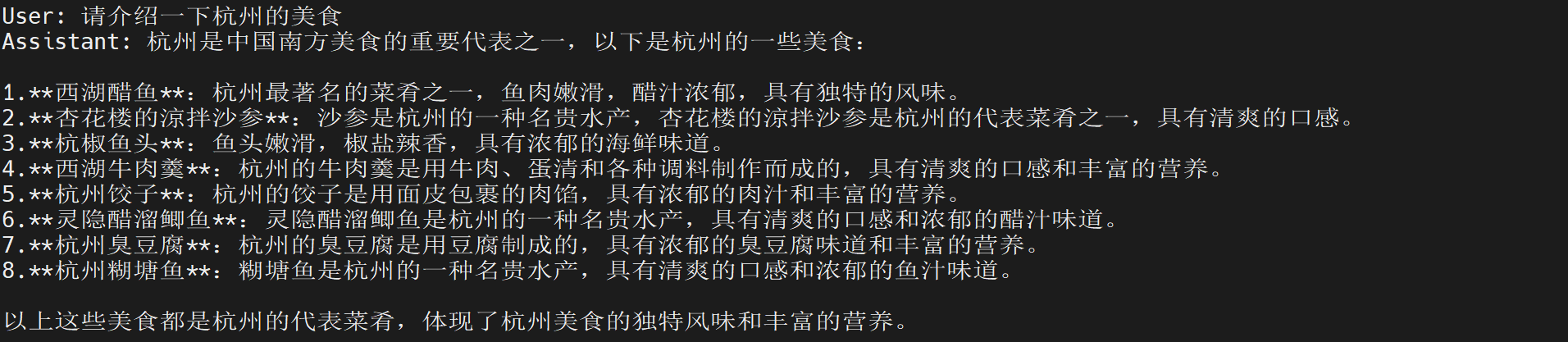
交互结果如下:
模型微调
参考Llama3模型ORPO微调教程,我们使用8张昇腾NPU,基于LLaMa Factory框架,采用DPO-En-Zh-20K数据集对模型Llama-3.1-8B-Instruct进行ORPO微调。
数据集
本地加载
- 下载DPO-En-Zh-20k数据集
感谢社区开发者在魔乐社区贡献的DPO-En-Zh-20k数据集,使用Git将数据集下载至本地。
git lfs install
git clone https://modelers.cn/AI-Research/DPO-En-Zh-20k.git
- 支持本地加载DPO-En-Zh-20k数据集
修改LLaMa Factory的data/dataset_info.json文件,将如下字段:
"dpo_mix_en": {
    "hf_hub_url": "hiyouga/DPO-En-Zh-20k",
    "subset": "en",
    "ranking": true,
    "formatting": "sharegpt",
    "columns": {
      "messages": "conversations",
      "chosen": "chosen",
      "rejected": "rejected"
    }
  },
  "dpo_mix_zh": {
    "hf_hub_url": "hiyouga/DPO-En-Zh-20k",
    "subset": "zh",
    "ranking": true,
    "formatting": "sharegpt",
    "columns": {
      "messages": "conversations",
      "chosen": "chosen",
      "rejected": "rejected"
    }
  },
更改为:
"dpo_mix_en": {
    "file_name": xxx, // 填写DPO-En-Zh-20k数据集中dpo_en.json的本地路径
    "subset": "en",
    "ranking": true,
    "formatting": "sharegpt",
    "columns": {
      "messages": "conversations",
      "chosen": "chosen",
      "rejected": "rejected"
    }
  },
  "dpo_mix_zh": {
    "file_name": xxx, // 填写DPO-En-Zh-20k数据集中dpo_zh.json的本地路径
    "subset": "zh",
    "ranking": true,
    "formatting": "sharegpt",
    "columns": {
      "messages": "conversations",
      "chosen": "chosen",
      "rejected": "rejected"
    }
  },
微调
在LLaMa Factory路径下新建examples/train_full/llama3_1_8B_instruct_full_orpo_ds3.yaml微调配置文件,微调配置文件如下:
### model
model_name_or_path: xxx # 当前仅支持本地加载,填写Llama-3.1-8B-Instruct本地权重路径

### method
stage: dpo
do_train: true
finetuning_type: full
pref_beta: 0.05
pref_loss: orpo
deepspeed: examples/deepspeed/ds_z3_config.json

### dataset
dataset: dpo_mix_en, dpo_mix_zh
template: llama3
cutoff_len: 8192
overwrite_cache: true
preprocessing_num_workers: 16

### output
output_dir: saves/llama3_1_8b_instruct/full/orpo
logging_steps: 5
save_strategy: epoch
plot_loss: true
overwrite_output_dir: true

### train
per_device_train_batch_size: 1
gradient_accumulation_steps: 8
learning_rate: 5.0e-6
num_train_epochs: 3.0
lr_scheduler_type: cosine
warmup_ratio: 0.1
bf16: true
ddp_timeout: 180000000
optim: adamw_hf
通过下面的命令启动微调:
export ASCEND_RT_VISIBLE_DEVICES=0,1,2,3,4,5,6,7
llamafactory-cli train examples/train_full/llama3_1_8B_instruct_full_orpo_ds3.yaml
微调可视化
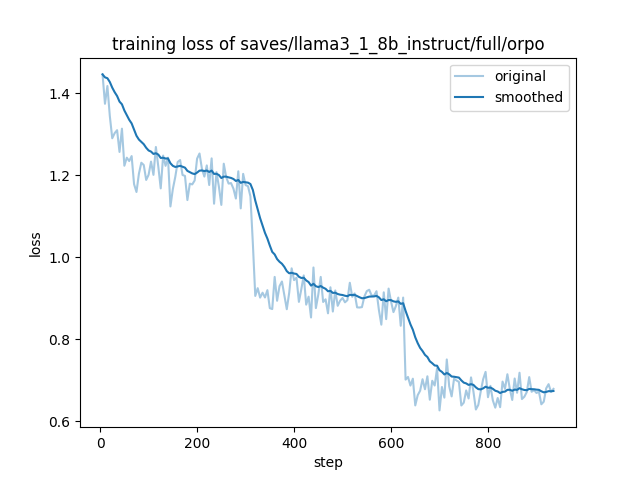
- 训练Loss可视化
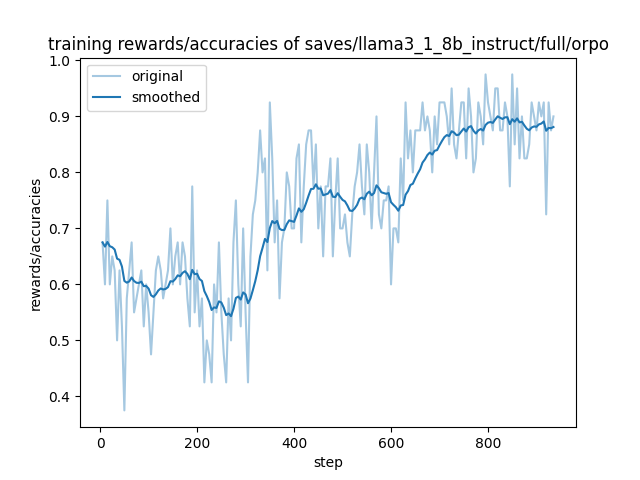
- 训练Rewards可视化
微调结果
微调结束后,在LLaMa Factory路径下新建examples/inference/llama3_1_8B_instruct_orpo.yaml推理配置文件,配置文件内容为:
model_name_or_path: saves/llama3_1_8b_instruct/full/orpo/checkpoint-936
template: llama3
通过下面的命令启动推理:
llamafactory-cli chat examples/inference/llama3_1_8B_instruct_orpo.yaml
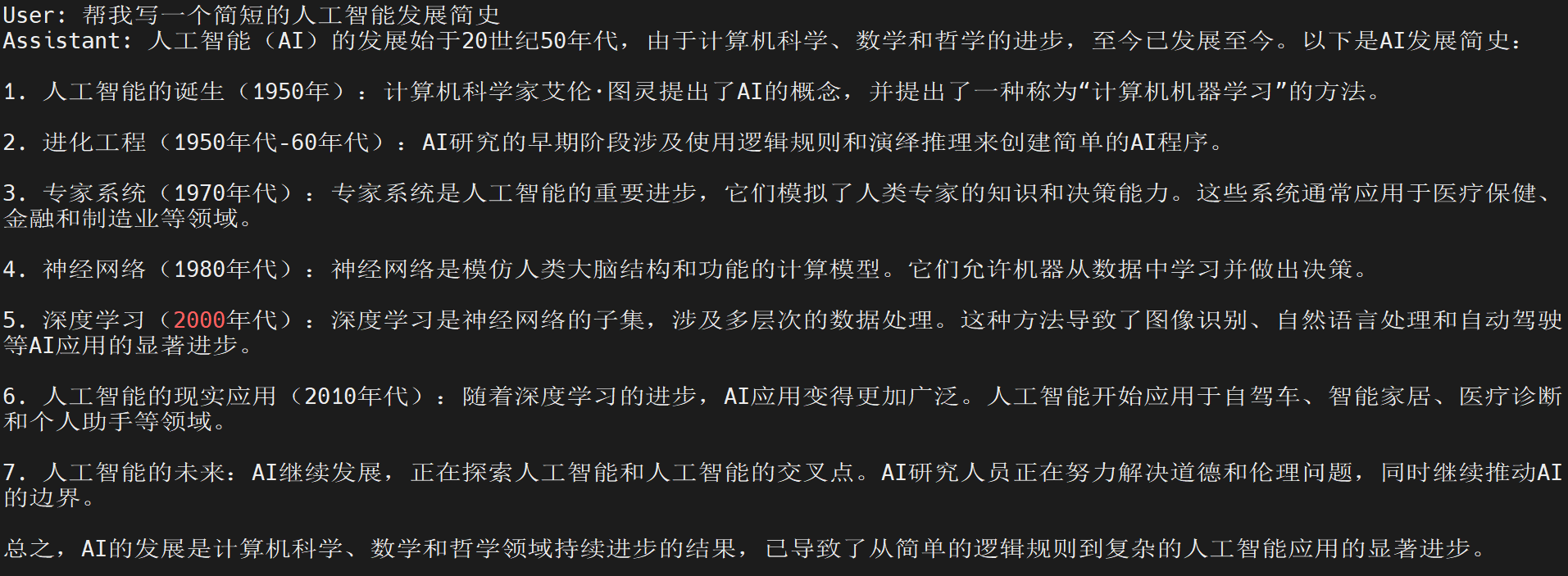
微调完成后,Llama 3.1 PyTorch模型的中文能力有一定提升,以下为部分微调结果:
- 问题1:我的蓝牙耳机坏了,我该去看牙科还是耳鼻喉科?

- 问题2:小刚的体重是28.4千克,小强的体重是小刚的1.4倍,小强的体重=多少千克?

- 问题3:帮我写一个简短的人工智能发展简史