

模型推理
模型推理(Model Inference)是指在机器学习和深度学习中,使用训练好的模型对新的输入数据进行处理,以得到预测结果或决策的过程。推理过程通常涉及以下步骤:
1、输入处理:将新的输入数据(如图像、文本、声音等)格式化或标准化,使其符合模型期望的输入格式。
2、前向传播:输入数据通过网络或模型的结构进行前向传播,这一过程中会涉及参数的加权求和、激活函数处理等操作。
3、输出生成:模型根据前向传播的结果生成输出,输出可以是分类标签、连续值、概率分布等。
4、后处理:在某些情况下,模型的原始输出需要进一步处理或转换,以便更加直观或符合应用需求。
而使用openMind Library pipeline可以端到端地一键调用AI模型,用户只需对代码进行简单编写,即可完成推理,大幅提升开发效率。
openMind Library pipeline方法支持PyTorch和MindSpore两种框架。此外,pipeline方法支持多个领域的任务,例如文本生成、文本分类、图像识别等。
本章节将从以下几个方面介绍如何使用pipeline加载模型并进行推理:
openMind Library环境准备
详细步骤参考openMind Library安装指南。
pipeline基本用法
当前的pipeline支持两种框架:PyTorch和MindSpore,在定义pipeline时,通过参数framework来指定,Pytorch框架为pt,MindSpore框架为ms。此外,Pytorch框架支持两种backend:transformers和diffusers,MindSpore支持三种backend:mindformers和mindnlp,通过参数backend传入。
在openMind Library中,每种框架下的各类推理任务,都有相应的pipeline方法。例如,在PyTorch框架下,文本转音频任务可以通过TextToAudioPipeline方法来实现。为了简化操作,我们提供了一个通用的pipeline方法,支持加载对应任务的方法。
支持的框架
当前,pipeline支持以下两种框架:
- PyTorch:使用
pt作为参数framework的值。 - MindSpore:使用
ms作为参数framework的值。
Backend 支持
此外,不同的框架支持不同的backend:
PyTorch框架支持以下两种
backend:transformersdiffusers
MindSpore框架支持以下两种
backend:mindformersmindnlp
这些backend都可以通过backend参数来指定。
pipeline使用举例
通过配置task,model,framework和backend,可以加载对应框架和任务的模型。
PyTorch框架下基于
transformers的文本生成任务:pythonfrom openmind import pipeline pipe = pipeline( task="text-generation", model="Baichuan/Baichuan2_7b_chat_pt", framework="pt", backend="transformers", trust_remote_code=True, device="npu:0", ) output = pipe("Give three tips for staying healthy.") print(output) ''' 输出: 1. Eat a balanced diet: Ensure that your diet includes a mix of fruits, vegetables, whole grains, lean proteins, and healthy fats. This will provide your body with the essential nutrients it needs to function properly. 2. Stay hydrated: Drink plenty of water throughout the day to help flush out toxins and maintain proper body functions. Avoid drinking too much sugar-sweetened or caffeinated beverages as these can lead to dehydration. 3. Be active: Aim to get at least 150 minutes of moderate-intensity aerobic activity or 75 minutes of vigorous-intensity aerobic activity per week, along with muscle-strengthening activities on two or more days per week. This will help you maintain a healthy weight, improve cardiovascular health, and reduce the risk of chronic diseases. '''PyTorch框架下基于
diffusers的文本生成图像任务:pythonfrom openmind import pipeline from PIL import Image pipe=pipeline( task="text-to-image", model="PyTorch-NPU/stable-diffusion-xl-base-1_0", framework="pt", backend="diffusers", device="npu:0", ) image = pipe("masterpiece, best quality, Cute dragon creature, pokemon style, night, moonlight, dim lighting") image.save("diffusers.png")
MindSpore框架下基于
mindformers的文本生成任务:pythonfrom openmind import pipeline import mindspore as ms ms.set_context(mode=0, device_id=0, jit_level='o0', infer_boost='on', max_device_memory='59GB') pipe = pipeline(task="text-generation", model='MindSpore-Lab/qwen1_5_7b', framework='ms', model_kwargs={"use_past": True}, trust_remote_code=True) outputs = pipe("Give me some advice on how to stay healthy.") print(outputs)MindSpore框架下基于
mindnlp的文本生成任务:pythonfrom openmind import pipeline generator = pipeline( task="text-generation", model="AI-Research/Qwen2-7B", framework="ms", backend="mindnlp", ) outputs = generator("Give me some advice on how to stay healthy.") print(outputs)
SiliconDiff推理加速
SiliconDiff介绍
SiliconDiff是由硅基流动研发的一款扩散模型加速库,基于领先的扩散模型加速技术,旨在通过结合国内顶尖硬件资源,如昇腾芯片,提供高性能的文生图解决方案。
SiliconDiff加速原理
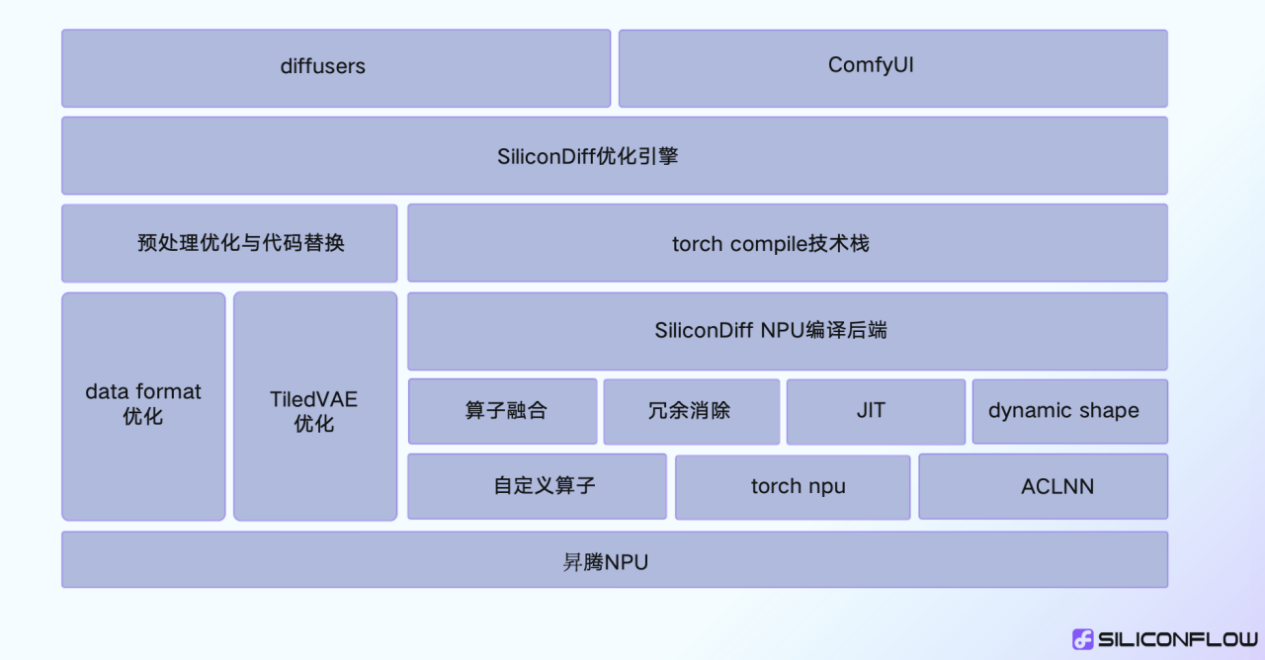
SiliconDiff整体基于torch compile+torch npu的技术方案,通过自定义的编译器后端支持算子融合、冗余计算消除和JIT优化,同时支持动态形状,切换形状无额外编译开销。
SiliconDiff使用
对于diffusers侧的任务,可以使用use_silicondiff参数来加速,提升推理的性能。
from openmind import pipeline
import torch

generator = pipeline(task="text-to-image",
                     model="PyTorch-NPU/stable-diffusion-xl-base-1_0",
                     device="npu:0",
                     torch_dtype=torch.float16,
                     use_silicondiff=True,
                     )

image = generator(prompt="masterpiece, best quality, Cute dragon creature, pokemon style, night, moonlight, dim lighting",)
silicondiff_npu和PyTorch的对应版本如下:
| PyTorch版本 | silicondiff_npu版本 |
|---|---|
| 2.1.0 | 2.1.0.post3 |
模型支持与性能提升
目前支持的模型,以及对应模型在Atlas 900 A2 PODc服务器上启用SiliconDiff后的性能提升情况如下。
| Model | 未开启SiliconDiff | 开启SiliconDiff | 性能提升 |
|---|---|---|---|
| Stable Diffusion v1.5 | 4.20s | 3.80s | 10.62% |
| SD-XL 1.0-base | 9.11s | 8.35s | 9.13% |
| Stable Diffusion v2.1 | 3.90s | 3.46s | 12.64% |
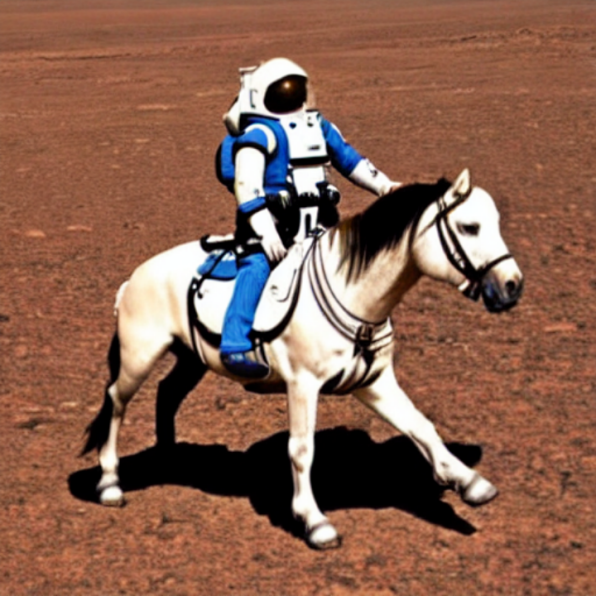
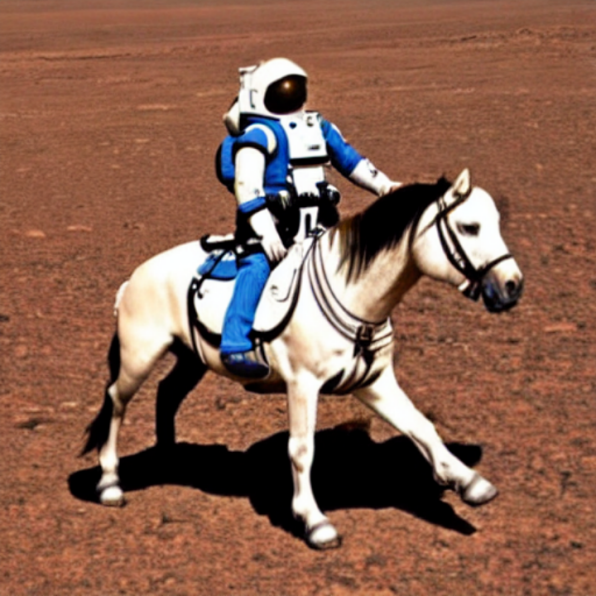
精度无损
使用SiliconDiff前后生成的图像对比如下。
| Diffusers + Torch-NPU | Diffusers + SiliconDiff-NPU |
|---|---|
 |  |
| Diffusers + Torch-NPU | Diffusers + SiliconDiff-NPU |
|---|---|
 |  |
默认加载
需要注意的时,当一些参数未指定时,pipeline会根据已有参数进行默认加载。
- 当只指定
task参数时,pipeline会根据默认的framework,backend和模型进行加载。 - 当只指定
task和framework时,pipeline会根据默认的backend和模型进行加载。 - 当只指定
task,framework和backend时,pipeline会根据默认的模型进行加载。
不同推理任务的默认framework,backend和模型见pipeline当前支持的推理任务及其默认参数。
在使用pipeline方式时,可以通过openMind模型库查找适合自己需求的模型。如果找不到合适的模型,开发者可以进行模型训练或模型微调。我们鼓励将训练/微调后的模型上传至openMind模型库分享给更多开发者使用,上传方式可参考模型分享。
pipeline参数
重要参数
framework
pipeline支持PyTorch(pt)和MindSpore(ms)两种框架,并通过framework参数来进行指定。以下为运行在MindSpore框架上的pipeline实例:
from openmind import pipeline

text_pipeline_ms = pipeline(task="text-generation", model="MindSpore-Lab/baichuan2_7b_chat", framework='ms')
output = text_pipeline_ms("hello!")
backend
PyTorch框架支持以下两种backend:transformers和diffusers。MindSpore框架支持两种backend:mindformers和mindnlp。通过backend参数来进行指定。
- 以下为运行在
MindSpore框架,后端指定为mindnlp的pipeline实例:
from openmind import pipeline

text_pipeline_ms = pipeline(task="text-generation", model="AI-Research/Qwen2-7B", framework='ms', backend="mindnlp")
output = text_pipeline_ms("Give me some advice on how to stay healthy.")
device
用户可以通过device参数来指定推理任务所在的处理器,当前支持CPU、NPU类型的处理器。如果不指定device参数,pipeline将会自动选取处理器。无论选择哪种处理器,在PyTorch框架和MindSpore框架上都可以正常运行。以下为运行在各处理器上的示例:
- 指定在CPU上
generator = pipeline(task="text-generation", device="cpu")
- 指定在NPU上
# PyTorch
generator = pipeline(task="text-generation", device="npu:0")
model和tokenizer
model参数除了支持传入模型地址,也支持传入实例化的模型对象来进行推理,model传入实例化的模型对象时,tokenizer也必须传入特定的实例化对象:
from openmind import pipeline
from openmind import AutoModelForSequenceClassification, AutoTokenizer

# 创建模型对象,并进行推理
model = AutoModelForSequenceClassification.from_pretrained("PyTorch-NPU/distilbert_base_uncased_finetuned_sst_2_english")
tokenizer = AutoTokenizer.from_pretrained("PyTorch-NPU/distilbert_base_uncased_finetuned_sst_2_english")
text_classifier = pipeline(task="text-classification", model=model, tokenizer=tokenizer, framework="pt")

outputs = text_classifier("This is great !")
# [{'label': 'POSITIVE', 'score': 0.9998694658279419}]
use_silicondiff
对于diffusers侧的任务,可以使用use_silicondiff参数来加速,提升推理的性能。
from openmind import pipeline
import torch

generator = pipeline(task="text-to-image",
                     model="PyTorch-NPU/stable-diffusion-xl-base-1_0",
                     device="npu:0",
                     torch_dtype=torch.float16,
                     use_silicondiff=True,
                     )

image = generator("masterpiece, best quality, Cute dragon creature, pokemon style, night, moonlight, dim lighting")
特定参数
pipeline提供了特定参数进行模型推理,可允许单独配置,以帮助用户完成工作。例如,对于文本生成任务,可以通过指定max_new_tokens和num_beams参数来控制生成的文本长度和生成的beam大小,以影响生成的结果:
from openmind import pipeline

# 设置特定任务参数
params = {
    "max_new_tokens": 50,  # 生成的文本长度限制为50个token
    "num_beams": 5  # 使用beam search算法生成文本,beam大小为5
}

text_generator = pipeline("text-generation", device="npu:0", trust_remote_code=True, **params)
generated_text = text_generator("Once upon a time,")
print(generated_text)

'''
输出:
Once upon a time, there was a small village nestled between two mountains. The villagers lived simple lives, working the land and taking care of their families. One day, a stranger arrived in the village. He was a wise old man with a long white beard and a ro
'''
全量参数
pipeline的全量参数可以参考Pipeline API接口
pipeline当前支持的推理任务及其默认参数
pipeline任务的默认框架、框架默认backend、当前支持的backend
| 任务名称 | 默认框架 | PyTorch默认backend | MindSpore默认backend | 当前支持的backend |
|---|---|---|---|---|
| text-classification | PyTorch | transformers | transformers | |
| text-to-image | PyTorch | diffusers | diffusers | |
| visual-question-answering | PyTorch | transformers | transformers | |
| zero-shot-object-detection | PyTorch | transformers | transformers | |
| zero-shot-classification | PyTorch | transformers | transformers | |
| depth-estimation | PyTorch | transformers | transformers | |
| image-to-image | PyTorch | transformers | transformers | |
| mask-generation | PyTorch | transformers | transformers | |
| text-generation | PyTorch | transformers | mindformers | transformers、mindformers、mindnlp |
| zero-shot-image-classification | PyTorch | transformers | transformers | |
| feature-extraction | PyTorch | transformers | transformers | |
| image-classification | PyTorch | transformers | transformers | |
| image-to-text | PyTorch | transformers | transformers | |
| text2text-generation | PyTorch | transformers | transformers | |
| token-classification | PyTorch | transformers | transformers | |
| fill-mask | PyTorch | transformers | transformers | |
| question-answering | PyTorch | transformers | transformers | |
| summarization | PyTorch | transformers | transformers | |
| table-question-answering | PyTorch | transformers | transformers | |
| translation | PyTorch | transformers | transformers |
PyTorch当前支持的推理任务与默认模型
transformers backend
| 任务名称 | 默认模型 |
|---|---|
| text-classification | "PyTorch-NPU/distilbert_base_uncased_finetuned_sst_2_english" |
| text-generation | "Baichuan/Baichuan2_7b_chat_pt" |
| question-answering | "PyTorch-NPU/roberta_base_squad2" |
| table-question-answering | "PyTorch-NPU/tapas_base_finetuned_wtq" |
| fill-mask | "PyTorch-NPU/bert_base_uncased" |
| summarization | "PyTorch-NPU/bart_large_cnn" |
| zero-shot-image-classification | "PyTorch-NPU/siglip_so400m_patch14_384" |
| feature-extraction | "PyTorch-NPU/xlnet_base_cased" |
| depth-estimation | "PyTorch-NPU/dpt_large" |
| image-classification | "PyTorch-NPU/beit_base_patch16_224" |
| image-to-image | "PyTorch-NPU/swin2SR_classical_sr_x2_64" |
| image-to-text | "PyTorch-NPU/blip-image-captioning-large" |
| mask-generation | "PyTorch-NPU/sam_vit_base" |
| text2text-generation | "PyTorch-NPU/flan_t5_base" |
| zero-shot-classification | "PyTorch-NPU/deberta_v3_large_zeroshot_v2.0" |
| zero-shot-object-detection | "PyTorch-NPU/owlvit_base_patch32" |
| token-classification | "PyTorch-NPU/camembert_ner" |
| translation | "PyTorch-NPU/t5_base" |
| visual-question-answering | "PyTorch-NPU/blip_vqa_base" |
diffusers backend
| 任务名称 | 默认模型 |
|---|---|
| text-to-image | "PyTorch-NPU/stable-diffusion-xl-base-1_0" |
MindSpore当前支持的推理任务
mindformers backend
| 任务名 | 默认模型 |
|---|---|
| text-generation | "MindSpore-Lab/qwen1_5_7b" |
【注意】使用mindformers进行MindSpore模型推理时,device的内存必须大于等于64GB。
mindnlp backend
| 任务名 | 默认模型 |
|---|---|
| text-generation | "AI-Research/Qwen2-7B" |