
DeepSeek在昇腾上的模型部署 - 优秀实践
2024年12月26日,DeepSeek-V3横空出世,以其卓越性能备受瞩目。该模型发布即支持昇腾,用户可在昇腾硬件和MindIE推理引擎上实现高效推理,但在实际操作中,部署流程与常见问题困扰着不少开发者。本文将为你详细阐述昇腾 DeepSeek 模型部署的优秀实践。
昇腾DeepSeek模型部署的常见问题及解决方案见DeepSeek在昇腾上的模型部署 - 常见问题及解决方案.
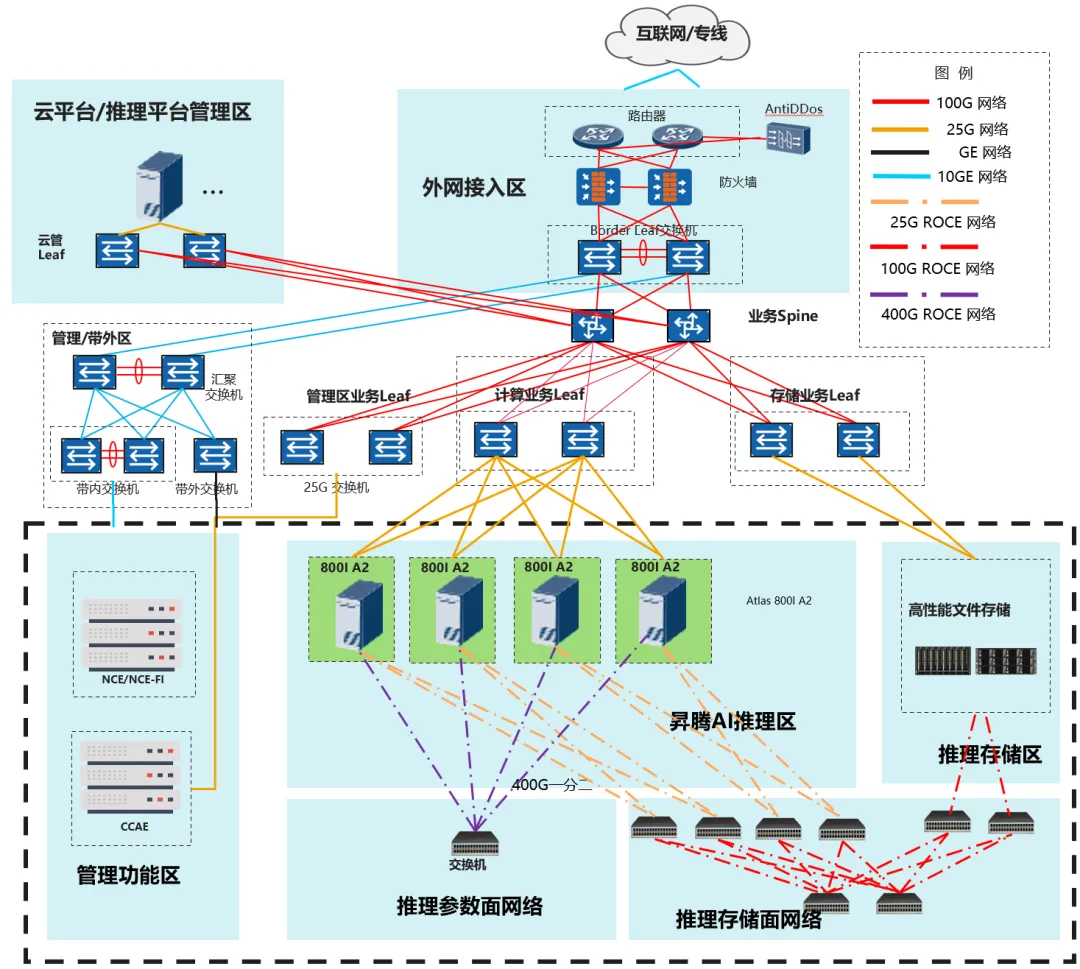
01 硬件要求及组网
推荐参考配置如下,部署DeepSeek-V3/R1量化模型至少需要多节点Atlas 800I A2(8*64G)服务器。本方案以DeepSeek-R1为主进行介绍,DeepSeek-V3与R1的模型结构和参数量一致,部署方式与R1相同。
02 运行环境准备
推荐使用镜像部署
1、镜像部署
昇腾官方在Ascend hub提供环境示例镜像,含推理部署配套软件以及模型运行脚本,用户可参考构建运行环境镜像进行部署。
镜像部署及启动参照ModelZoo指南中“加载镜像”章节,该指南中还包含“容器启动”等指引: https://gitee.com/ascend/ModelZoo-PyTorch/tree/master/MindIE/LLM/DeepSeek/DeepSeek-R1#加载镜像
镜像申请/下载(含于上述指南):https://www.hiascend.com/developer/ascendhub/detail/af85b724a7e5469ebd7ea13c3439d48f

2、裸机部署
根据MindIE安装指南安装软件包和运行依赖软件。
安装指南:
根据指南安装全部软件包和环境https://www.hiascend.com/document/detail/zh/mindie/100/envdeployment/instg/mindie_instg_0001.html
模型获取:https://modelers.cn/models/MindIE/DeepSeek-R1
03 权重文件准备
BF16权重下载: https://modelers.cn/models/State_Cloud/DeepSeek-V3-BF16
INT8量化后权重下载: https://modelers.cn/models/State_Cloud/DeepSeek-R1-W8A8/tree/main
如已下载BF16模型,也可采用以下步骤进行模型量化,权重BF16->INT8转换预计7~8小时。
Step1:安装ModelSlim
git clone https://gitee.com/ascend/msit.git
cd msit/msmodelslim
bash install.sh
Step2: 运行量化命令
cd msit/msmodelslim/example/DeepSeek/
python3 quant_deepseek_w8a8.py \
                --model_path {浮点权重路径} \
                --save_path {W8A8量化权重路径}
更多详细量化教程请参考 DeepSeek量化文档( https://gitee.com/ascend/msit/tree/br_noncom_MindStudio_8.0.0_POC_20251231/msmodelslim/example/DeepSeek)
Msmodelslim 代码仓:https://gitee.com/ascend/msit/tree/br_noncom_MindStudio_8.0.0_POC_20251231/msmodelslim
04 运行前检查
服务器检查:https://gitee.com/ascend/ModelZoo-PyTorch/tree/master/MindIE/LLM/DeepSeek/DeepSeek-R1#前置准备
软件版本配套检查,含:HDK、CANN、PTA、MindIE、MindStudio
1、检查组网链接状态
a) 检查物理链接for i in {0..7}; do hccn_tool -i $i -lldp -g | grep Ifname; done
b) 检查链接情况for i in {0..7}; do hccn_tool -i $i -link -g ; done
c) 检查网络健康情况for i in {0..7}; do hccn_tool -i $i -net_health -g ; done
d) 查看侦测ip的配置是否正确for i in {0..7}; do hccn_tool -i $i -netdetect -g ; done
e) 查看网关是否配置正确for i in {0..7}; do hccn_tool -i $i -gateway -g ; done
f) 检查NPU底层tls校验行为一致性,建议全0for i in {0..7}; do hccn_tool -i $i -tls -g ; done | grep switch
g) # NPU底层tls校验行为置0操作for i in {0..7};do hccn_tool -i $i -tls -s enable 0;done
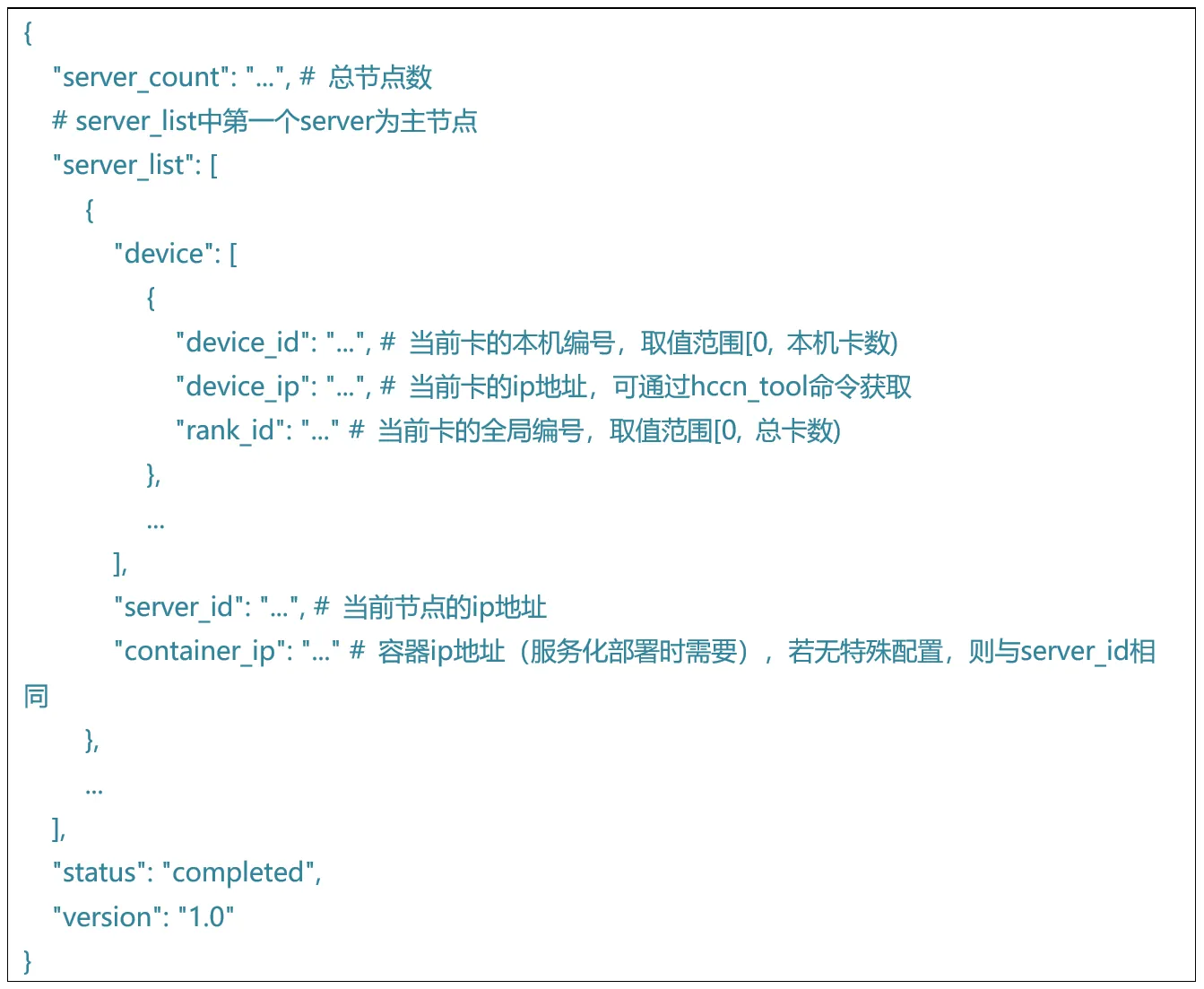
2、根据组网设置准备rank_table_file.json
使用多节点推理时,需要将包含设备ip,服务器ip等信息的json文件地址传递给底层通信算子。参考如下格式,配置rank_table_file.json:
05 模型部署与配置
独立模型:https://modelers.cn/models/MindIE/DeepSeek-R1
服务化部署:
1、运行指南 https://modelers.cn/models/MindIE/DeepSeek-R1/blob/main/README.md(服务化测试)
06 模型运行
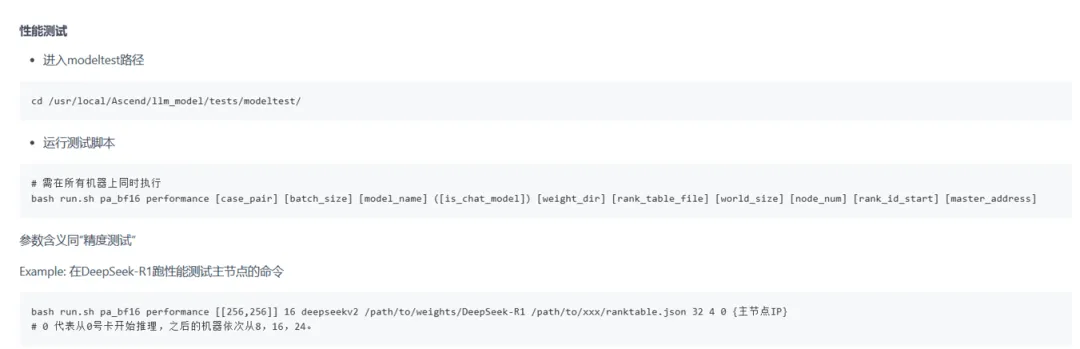
1、纯模型测试
模型脚本已预制在镜像中,参照以下链接即可拉起精度测试及模型测试https://modelers.cn/models/MindIE/DeepSeek-R1/blob/main/README.md (纯模型测试部分)
2、服务化测试
1、运行指南 https://gitee.com/ascend/ModelZoo-PyTorch/tree/master/MindIE/LLM/DeepSeek/DeepSeek-R1#服务化测试