

Model Inference
In machine learning and deep learning, model inference is a process in which a trained model is used to make predictions on new input data. The inference process usually involves the following steps:
Input processing: Formats or standardizes new input data (such as images, texts, and sounds) so the input can be accepted by the model.
Forward propagation: The input data is propagated forward through the network or model structure. This process involves operations such as weighted summation of parameters and function activation.
Output generation: The model generates output based on the forward propagation result. The output can be a classification label, continuous value, or probability distribution.
Postprocessing: In some cases, the original output of the model needs to be further processed or converted to be more intuitive or meet application requirements.
These can all be done by using openMind Library pipeline, which calls AI models in an end-to-end manner. You only need to compile code simply to complete inference, greatly improving development efficiency.
openMind Library pipeline method supports the PyTorch and MindSpore frameworks. In addition, pipeline supports tasks in multiple domains, such as text generation, text classification, and image recognition.
This document describes how to use the pipeline to load a model and perform inference from the following aspects:
openMind Library Environment Setup
For details, see openMind Library Installation Guide.
Basic Pipeline Usage
The pipeline supports two frameworks: PyTorch and MindSpore. When defining the pipeline, you can use the framework parameter to specify the framework. pt indicates the PyTorch framework, and ms indicates the MindSpore framework. PyTorch framework supports two types of backend: transformers and diffusers. MindSpore supports three types of backend: mindformers, mindone, and mindnlp, which are transferred through the backend parameter.
In openMind Library, inference tasks in each framework have their own pipeline methods. For example, in the PyTorch framework, a text-to-audio task may be implemented by using the TextToAudioPipeline method. To streamline operations, a common pipeline method is provided to load the corresponding task.
Supported Frameworks
The pipeline supports the following frameworks:
- PyTorch:
ptis used as the value offramework. - MindSpore:
msis used as the value offramework.
Supported Backends
In addition, different frameworks support different backend.
The PyTorch framework supports the following two types of
backend:transformersdiffusers
The MindSpore framework supports the following two types of
backend:mindformersmindnlpmindone
These backend types can be specified by the backend parameter.
Example of Using the Pipeline
You can configure task, model, framework, and backend to load the model of the corresponding framework and task.
Text generation task based on
transformersin the PyTorch framework:pythonfrom openmind import pipeline pipe = pipeline( task="text-generation", model="Baichuan/Baichuan2_7b_chat_pt", framework="pt", backend="transformers", trust_remote_code=True, device="npu:0", ) output = pipe("Give three tips for staying healthy.") print(output) ''' Output: 1. Eat a balanced diet: Ensure that your diet includes a mix of fruits, vegetables, whole grains, lean proteins, and healthy fats. This will provide your body with the essential nutrients it needs to function properly. 2. Stay hydrated: Drink plenty of water throughout the day to help flush out toxins and maintain proper body functions. Avoid drinking too much sugar-sweetened or caffeinated beverages as these can lead to dehydration. 3. Be active: Aim to get at least 150 minutes of moderate-intensity aerobic activity or 75 minutes of vigorous-intensity aerobic activity per week, along with muscle-strengthening activities on two or more days per week. This will help you maintain a healthy weight, improve cardiovascular health, and reduce the risk of chronic diseases. '''Text-to-image generation task based on
diffusersin the PyTorch framework:pythonfrom openmind import pipeline from PIL import Image pipe=pipeline( task="text-to-image", model="PyTorch-NPU/stable-diffusion-xl-base-1_0", framework="pt", backend="diffusers", device="npu:0", ) image = pipe("masterpiece, best quality, Cute dragon creature, pokemon style, night, moonlight, dim lighting") image.save("diffusers.png")
Text generation task based on
mindformersin the MindSpore framework:pythonfrom openmind import pipeline import mindspore as ms ms.set_context(mode=0, device_id=0, jit_level='o0', infer_boost='on', max_device_memory='59GB') pipe = pipeline(task="text-generation", model='MindSpore-Lab/qwen1_5_7b', framework='ms', model_kwargs={"use_past": True}, trust_remote_code=True) outputs = pipe("Give me some advice on how to stay healthy.") print(outputs)Text generation task based on
mindnlpin the MindSpore framework:pythonfrom openmind import pipeline generator = pipeline( task="text-generation", model="AI-Research/Qwen2-7B", framework="ms", backend="mindnlp", ) outputs = generator("Give me some advice on how to stay healthy.") print(outputs)Text-to-image generation task based on mindone in the MindSpore framework:
pythonfrom openmind import pipeline import mindspore pipe = pipeline( "text-to-image", model="AI-Research/stable-diffusion-3-medium-diffusers", backend="mindone", framework="ms", mindspore_dtype=mindspore.float16, ) image = pipe("Astronaut in a jungle, cold color palette, muted colors, detailed, 8k")[0][0] image.save("mindone.png")
SiliconDiff Inference Acceleration
Introduction to SiliconDiff
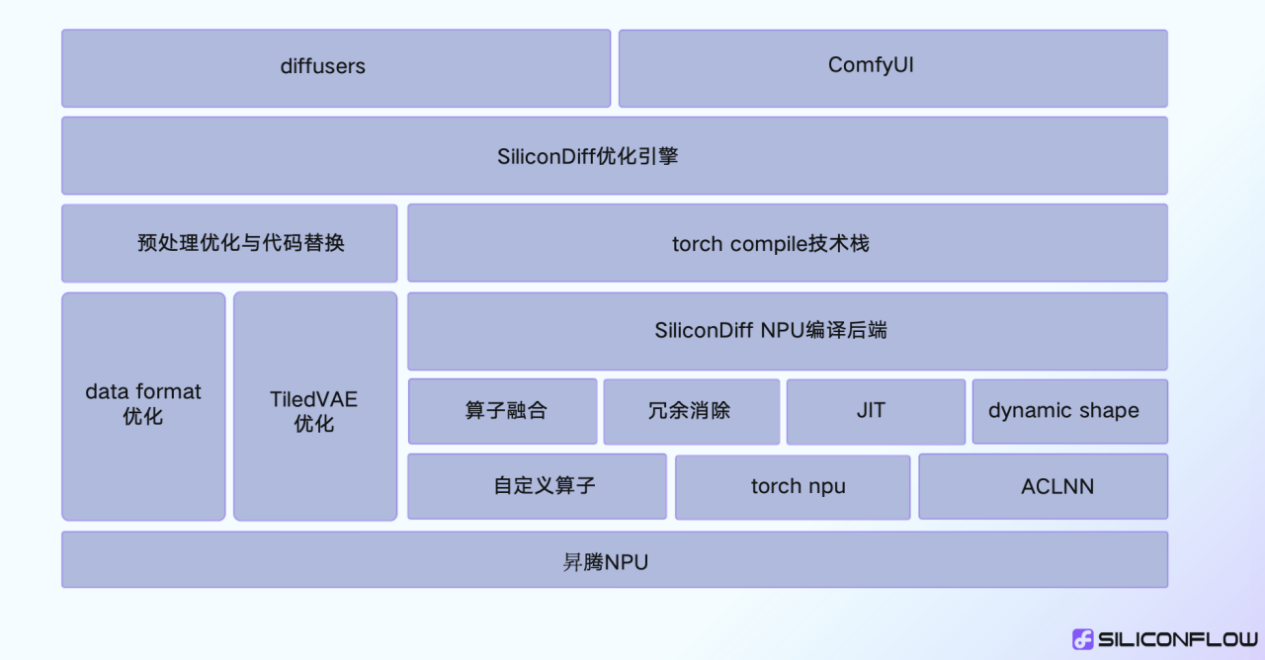
SiliconDiff is a diffusion model acceleration library developed by SiliconFlow. Based on the leading diffusion model acceleration technology, SiliconDiff aims to provide high-performance text-to-image solutions by combining top hardware resources in China, such as Ascend chips.
SiliconDiff Acceleration Principles
SiliconDiff is based on the torch compile + torch npu technical solution. It supports operator fusion, redundancy calculation elimination, and JIT optimization at the backend of the customized compiler. In addition, it supports dynamic shapes. No extra compilation overhead is required for shape switching.
Using SiliconDiff
For tasks on the diffusers, you can use the use_silicondiff parameter to accelerate the inference and improve the inference performance.
from openmind import pipeline
import torch

generator = pipeline(task="text-to-image",
                     model="PyTorch-NPU/stable-diffusion-xl-base-1_0",
                     device="npu:0",
                     torch_dtype=torch.float16,
                     use_silicondiff=True,
                     )

image = generator(prompt="masterpiece, best quality, Cute dragon creature, pokemon style, night, moonlight, dim lighting",)
The versions of silicondiff_npu and PyTorch are as follows:
| PyTorch Version | silicondiff_npu Version |
|---|---|
| 2.1.0 | 2.1.0.post3 |
Model Support and Performance Improvement
The following table lists the supported models and their performance improvement after SiliconDiff is enabled on the server.
| Model | SiliconDiff Disabled | SiliconDiff Enabled | Performance |
|---|---|---|---|
| Stable Diffusion v1.5 | 4.20s | 3.80s | 10.62% |
| SD-XL 1.0-base | 9.11s | 8.35s | 9.13% |
| Stable Diffusion v2.1 | 3.90s | 3.46s | 12.64% |
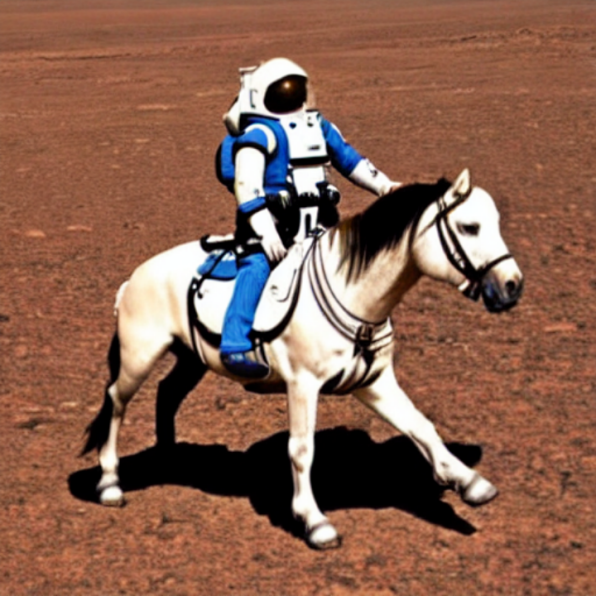
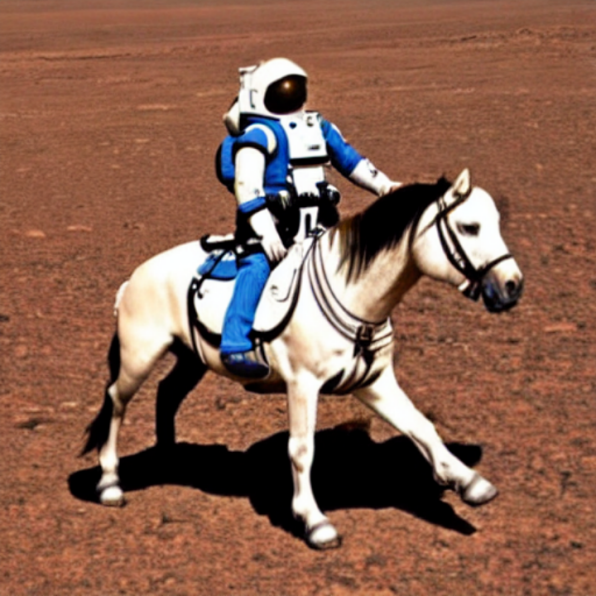
Lossless Accuracy
The following figure shows the images generated before and after SiliconDiff is used.
| Diffusers + Torch-NPU | Diffusers + SiliconDiff-NPU |
|---|---|
 |  |
| Diffusers + Torch-NPU | Diffusers + SiliconDiff-NPU |
|---|---|
 |  |
Default Loading
Note that if some parameters are not specified, pipeline is loaded by default based on the existing parameter settings.
- If only the
taskparameter is specified, thepipelineis loaded based on the defaultframework,backend, and model. - If only the
taskandframeworkare specified, thepipelineis loaded based on the defaultbackendand model. - If only the
task,framework, andbackendare specified, thepipelineis loaded based on the default model.
For details about the default framework, backend and model of different inference tasks, see Inference Tasks and Parameters Supported by Pipeline.
When using pipeline, you can use openMind Models to search for models that meet your requirements. If no proper model is found, you can train the model or fine-tune the model. You are advised to upload the trained or fine-tuned model to the openMind Models for sharing with developers. For details about how to upload the model, see Model Sharing.
Pipeline Parameters
Key Parameters
framework
pipeline supports the PyTorch (pt) and MindSpore (ms) framework, which are specified by framework. The following is a pipeline instance running on the MindSpore framework:
from openmind import pipeline

text_pipeline_ms = pipeline(task="text-generation", model="MindSpore-Lab/baichuan2_7b_chat", framework='ms')
output = text_pipeline_ms("hello!")
backend
The PyTorch framework supports the following two types of backend: transformers and diffusers The MindSpore framework supports three backend: mindformers, mindone, and mindnlp. The value is specified by the backend parameter.
- The following is a
pipelineinstance that runs in theMindSporeframework and is specified asmindnlpat the backend:
from openmind import pipeline

text_pipeline_ms = pipeline(task="text-generation", model="AI-Research/Qwen2-7B", framework='ms', backend="mindnlp")
output = text_pipeline_ms("Give me some advice on how to stay healthy.")
device
You can use the device parameter to specify the processor where the inference task is located. Currently, three types of processors are supported: CPU and NPU. If the device parameter is not specified, pipeline automatically selects a processor. All these three processors can run properly on the PyTorch and MindSpore frameworks. The following lists examples using different processor:
- CPU
generator = pipeline(task="text-generation", device="cpu")
- NPU
# PyTorch
generator = pipeline(task="text-generation", device="npu:0")
model and tokenizer
In addition to the model address, the model parameter can also be used to pass an instantiated model object for inference. When the model parameter is used to pass an instantiated model object, the tokenizer parameter must also be used to pass a specific instantiated object.
from openmind import pipeline
from openmind import AutoModelForSequenceClassification, AutoTokenizer

# Create a model object and perform inference.
model = AutoModelForSequenceClassification.from_pretrained("PyTorch-NPU/distilbert_base_uncased_finetuned_sst_2_english")
tokenizer = AutoTokenizer.from_pretrained("PyTorch-NPU/distilbert_base_uncased_finetuned_sst_2_english")
text_classifier = pipeline(task="text-classification", model=model, tokenizer=tokenizer, framework="pt")

outputs = text_classifier("This is great !")
# [{'label': 'POSITIVE', 'score': 0.9998694658279419}]
use_silicondiff
For tasks on the diffusers, you can use the use_silicondiff parameter to accelerate the inference and improve the inference performance.
from openmind import pipeline
import torch

generator = pipeline(task="text-to-image",
                     model="PyTorch-NPU/stable-diffusion-xl-base-1_0",
                     device="npu:0",
                     torch_dtype=torch.float16,
                     use_silicondiff=True,
                     )

image = generator("masterpiece, best quality, Cute dragon creature, pokemon style, night, moonlight, dim lighting")
Specific Parameters
pipeline provides specific parameters for model inference, which can be configured separately. For a text generation task, you can specify parameters such as max_new_tokens and num_beams to control the text length and beam size to be generated.
from openmind import pipeline

# Set task-specific parameters.
params = {
    "max_new_tokens": 50,  # Limit the text length to be generated to 50 tokens.
    "num_beams": 5  # Use the beam search algorithm to generate text. The beam size is 5.
}

text_generator = pipeline("text-generation", device="npu:0", trust_remote_code=True, **params)
generated_text = text_generator("Once upon a time,")
print(generated_text)

'''
Output:
Once upon a time, there was a small village nestled between two mountains. The villagers lived simple lives, working the land and taking care of their families. One day, a stranger arrived in the village. He was a wise old man with a long white beard and a ro
'''
Full Parameter Reference
For details about all pipeline parameters, see Pipeline APIs.
Inference Tasks and Parameters Supported by Pipeline
Default framework of the pipeline task, default backend of the framework, and supported backend types
| Task Name | Default Framework | Default Backend of PyTorch | Default Backend of MindSpore | Supported Backend |
|---|---|---|---|---|
| text-classification | PyTorch | transformers | transformers | |
| text-to-image | PyTorch | diffusers | mindone | diffusers, mindone |
| visual-question-answering | PyTorch | transformers | transformers | |
| zero-shot-object-detection | PyTorch | transformers | transformers | |
| zero-shot-classification | PyTorch | transformers | transformers | |
| depth-estimation | PyTorch | transformers | transformers | |
| image-to-image | PyTorch | transformers | transformers | |
| mask-generation | PyTorch | transformers | transformers | |
| text-generation | PyTorch | transformers | mindformers | transformers, mindformers, mindnlp |
| zero-shot-image-classification | PyTorch | transformers | transformers | |
| feature-extraction | PyTorch | transformers | transformers | |
| image-classification | PyTorch | transformers | transformers | |
| image-to-text | PyTorch | transformers | transformers | |
| text2text-generation | PyTorch | transformers | transformers | |
| token-classification | PyTorch | transformers | transformers | |
| fill-mask | PyTorch | transformers | transformers | |
| question-answering | PyTorch | transformers | transformers | |
| summarization | PyTorch | transformers | transformers | |
| table-question-answering | PyTorch | transformers | transformers | |
| translation | PyTorch | transformers | transformers |
Inference Tasks and Models Supported by PyTorch
transformers backend
| Task Name | Default Model |
|---|---|
| text-classification | "PyTorch-NPU/distilbert_base_uncased_finetuned_sst_2_english" |
| text-generation | "Baichuan/Baichuan2_7b_chat_pt" |
| question-answering | "PyTorch-NPU/roberta_base_squad2" |
| table-question-answering | "PyTorch-NPU/tapas_base_finetuned_wtq" |
| fill-mask | "PyTorch-NPU/bert_base_uncased" |
| summarization | "PyTorch-NPU/bart_large_cnn" |
| zero-shot-image-classification | "PyTorch-NPU/siglip_so400m_patch14_384" |
| feature-extraction | "PyTorch-NPU/xlnet_base_cased" |
| depth-estimation | "PyTorch-NPU/dpt_large" |
| image-classification | "PyTorch-NPU/beit_base_patch16_224" |
| image-to-image | "PyTorch-NPU/swin2SR_classical_sr_x2_64" |
| image-to-text | "PyTorch-NPU/blip-image-captioning-large" |
| mask-generation | "PyTorch-NPU/sam_vit_base" |
| text2text-generation | "PyTorch-NPU/flan_t5_base" |
| zero-shot-classification | "PyTorch-NPU/deberta_v3_large_zeroshot_v2.0" |
| zero-shot-object-detection | "PyTorch-NPU/owlvit_base_patch32" |
| token-classification | "PyTorch-NPU/camembert_ner" |
| translation | "PyTorch-NPU/t5_base" |
| visual-question-answering | "PyTorch-NPU/blip_vqa_base" |
diffusers backend
| Task Name | Default Model |
|---|---|
| text-to-image | "PyTorch-NPU/stable-diffusion-xl-base-1_0" |
Inference Tasks Supported by MindSpore
mindformers backend
| Task Name | Default Model |
|---|---|
| text-generation | "MindSpore-Lab/qwen1_5_7b" |
[Note] When Mindformers is used for MindSpore model inference, the device memory must be greater than or equal to 64 GB.
mindnlp backend
| Task Name | Default Model |
|---|---|
| text-generation | "AI-Research/Qwen2-7B" |
mindone backend
| Task Name | Default Model |
|---|---|
| text-to-image | "AI-Research/stable-diffusion-3-medium-diffusers" |